A thread is the smallest unit of execution that an operating system schedules. A process can contain one thread or many. Threads in operating system design let a program do several things at once: a web browser can load a page, play a video and respond to clicks at the same time.
This guide explains what threads share, how they differ from processes, the main threading models and how Linux and Windows implement them.
What threads share and what they keep
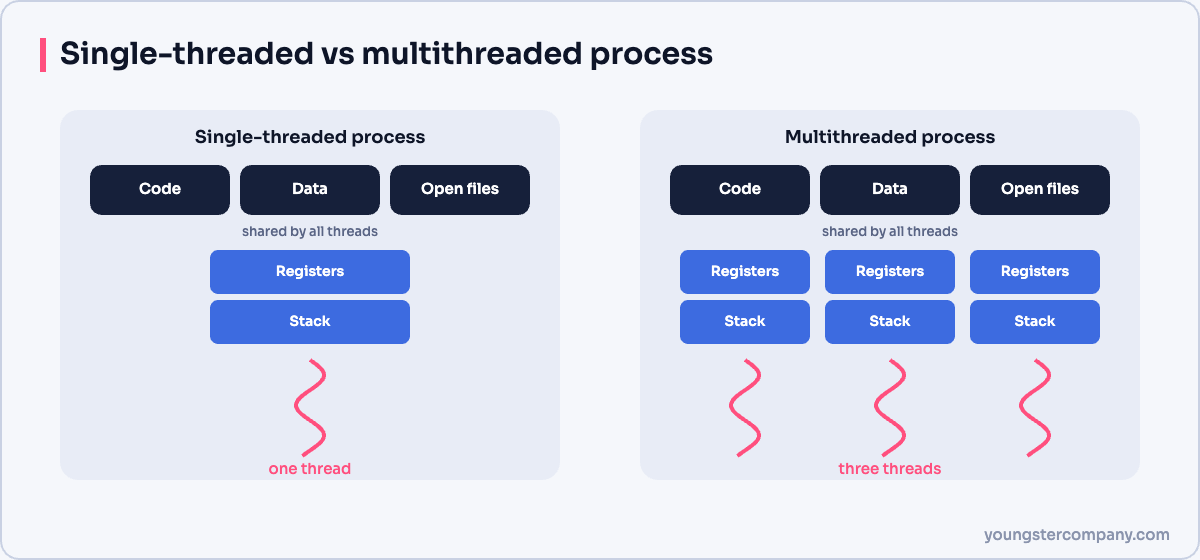
All threads in a process share:
- the program code;
- global data and the heap;
- open files and network sockets;
- the process’s security context and address space.
However, each thread keeps its own:
- program counter (the next instruction to run);
- registers;
- stack, for local variables and function calls;
- thread ID and scheduling state.
Because threads share memory, they can exchange data quickly. On the other hand, this sharing is also the source of most threading bugs.
Threads vs processes
| Aspect | Process | Thread |
|---|---|---|
| Memory | Own address space | Shares the process’s address space |
| Creation cost | Higher | Lower |
| Switching cost | Higher (address space change) | Lower within the same process |
| Communication | Needs IPC, such as pipes or sockets | Direct shared memory |
| Isolation | A crash usually affects one process only | One bad thread can crash the whole process |
Benefits of multithreading
- Responsiveness: one thread handles the user interface while others work in the background.
- Resource sharing: threads use the same memory without copying data.
- Lower overhead: creating and switching threads is cheaper than processes.
- Multicore use: threads of one process can run in parallel on different cores.
Challenges
Shared memory brings risks:
- Race conditions: two threads update the same data at once and corrupt it.
- Deadlocks: threads wait for each other’s locks forever. See our guide to deadlock.
- Harder debugging: bugs may appear only under certain timing.
Developers therefore use synchronisation tools such as mutexes, semaphores and condition variables, or design code to avoid shared state.
User threads and kernel threads
User-level threads are managed by a library in user space. They are fast to create, but the kernel does not see them. As a result, one blocking system call can stall the whole process.
Kernel-level threads are managed by the operating system. The kernel can schedule them on different cores and keep others running when one blocks.
Threading models
| Model | How it works | Example |
|---|---|---|
| Many-to-one | Many user threads map to one kernel thread | Early “green threads” libraries |
| One-to-one | Each user thread maps to its own kernel thread | Linux (NPTL) and Windows |
| Many-to-many | Many user threads map to a smaller or equal number of kernel threads | Go’s goroutines on top of OS threads, in effect |
Threads in Linux
Linux treats threads as tasks that share resources. The clone() system call creates a new task and uses flags to choose what to share, such as memory, open files and signal handlers. The NPTL library builds POSIX threads (pthreads) on top of this. You can list a process’s threads with ps -T -p PID or in top by pressing H.
Threads in Windows
Windows uses a one-to-one model. Each process starts with one thread and can create more with the CreateThread API. The Windows scheduler works at the thread level, using priorities from 0 to 31. Task Manager’s Details tab can show the thread count for each process.
Related guides
Sources
Running Linux servers in production? Our Linux server hardening & security audit checks configuration, patching, SSH and logging. You can also use our free Linux server hardening checklist, or contact us.