Storage is the slowest major component in most computers, and it holds everything that must survive a reboot. Disk management covers how the operating system organises, schedules, protects and maintains that storage. It includes partitioning and formatting, ordering read and write requests, combining disks with RAID, and handling failures.
This guide explains each part, with a disk scheduling example and notes on how SSDs changed the picture.
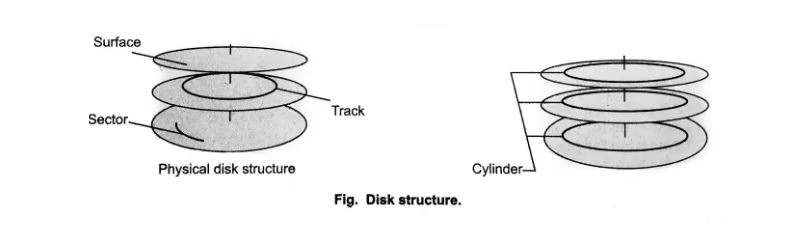
Disk structure
A traditional hard disk drive (HDD) stores data on spinning platters. Each surface has concentric tracks, divided into sectors, usually 512 bytes or 4 KB. Tracks at the same position on all platters form a cylinder. A read/write head on an arm moves across the tracks.
Access time has three parts:
- seek time: moving the head to the right track;
- rotational latency: waiting for the sector to spin under the head;
- transfer time: reading or writing the data.
Seek time is usually the largest, which is why disk scheduling matters for HDDs.
Preparing a disk
Before use, the OS prepares a disk in three steps:
- Partitioning: split the disk into partitions using MBR or the newer GPT scheme.
- Formatting: create a file system, such as ext4, XFS or NTFS, on each partition.
- Mounting: attach the file system to the directory tree or a drive letter.
On Linux, tools like lsblk, fdisk, parted and mkfs handle these steps. On Windows, the Disk Management console and diskpart do the same. Logical Volume Management (LVM) adds flexibility on top; see our guide to LVM partitions.
Disk scheduling algorithms
When many requests wait, the OS chooses the order to reduce head movement. Consider a disk with cylinders 0 to 199, the head at cylinder 50 moving towards higher numbers, and requests for cylinders 82, 17, 43, 140, 24, 16 and 190.
| Algorithm | How it works | Total head movement |
|---|---|---|
| FCFS | Serve requests in arrival order | 518 cylinders |
| SSTF | Always serve the closest request | 208 cylinders |
| SCAN (elevator) | Move to one end, then reverse | 332 cylinders |
| LOOK | Like SCAN, but reverse at the last request | 314 cylinders |
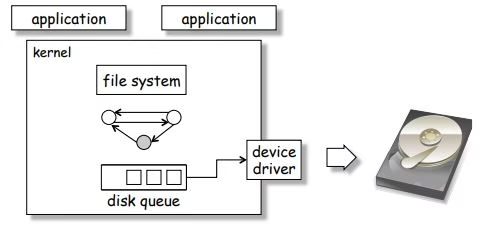
SSTF moves the head least in this example. However, it can starve requests at the edges. SCAN and LOOK are fairer, and C-SCAN gives more uniform waiting times by returning to the start after each sweep.
On Linux, modern I/O schedulers include mq-deadline, BFQ and none. For fast NVMe SSDs, “none” is common, because the drive handles ordering itself.
RAID
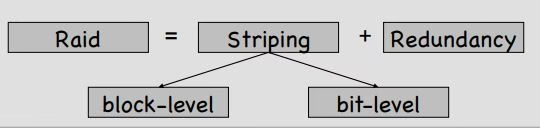
RAID combines several disks to improve performance, capacity or reliability.
| Level | How it works | Survives | Usable capacity |
|---|---|---|---|
| RAID 0 | Striping | No disk failure | 100% |
| RAID 1 | Mirroring | One disk per mirror | 50% |
| RAID 5 | Striping with single parity | One disk | (n − 1) disks |
| RAID 6 | Striping with double parity | Two disks | (n − 2) disks |
| RAID 10 | Mirrored pairs, then striped | One disk per pair | 50% |
Remember that RAID is not a backup. It protects against disk failure, but not against deletion, ransomware or fire.
Bad blocks and disk health
Disks develop faulty sectors over time. Drives remap many bad sectors automatically to spare areas. In addition, operating systems and tools can mark bad blocks so the file system avoids them. Monitor drive health with S.M.A.R.T. data, for example using smartctl on Linux, and replace drives that show growing error counts.
SSDs and modern storage
Solid-state drives have no moving parts, so seek time almost disappears. They bring different concerns:
- TRIM tells the SSD which blocks are free, keeping performance high.
- Wear levelling spreads writes across cells, because flash cells wear out.
- NVMe connects SSDs over PCIe for much higher speed than SATA.
Many servers also use tiered or hybrid storage, keeping hot data on SSDs and colder data on HDDs or in the cloud.
Related guides
Sources
Running Linux servers in production? Our Linux server hardening & security audit checks configuration, patching, SSH and logging. You can also use our free Linux server hardening checklist, or contact us.