An operating system is one of the most complex programs on a computer. How its parts are organised affects speed, reliability, security and how easy it is to change. The structure of operating system designs falls into a few main approaches, each with clear trade-offs.
This guide explains simple, monolithic, layered, microkernel, modular and hybrid structures, as well as virtual machines, with real examples of each.
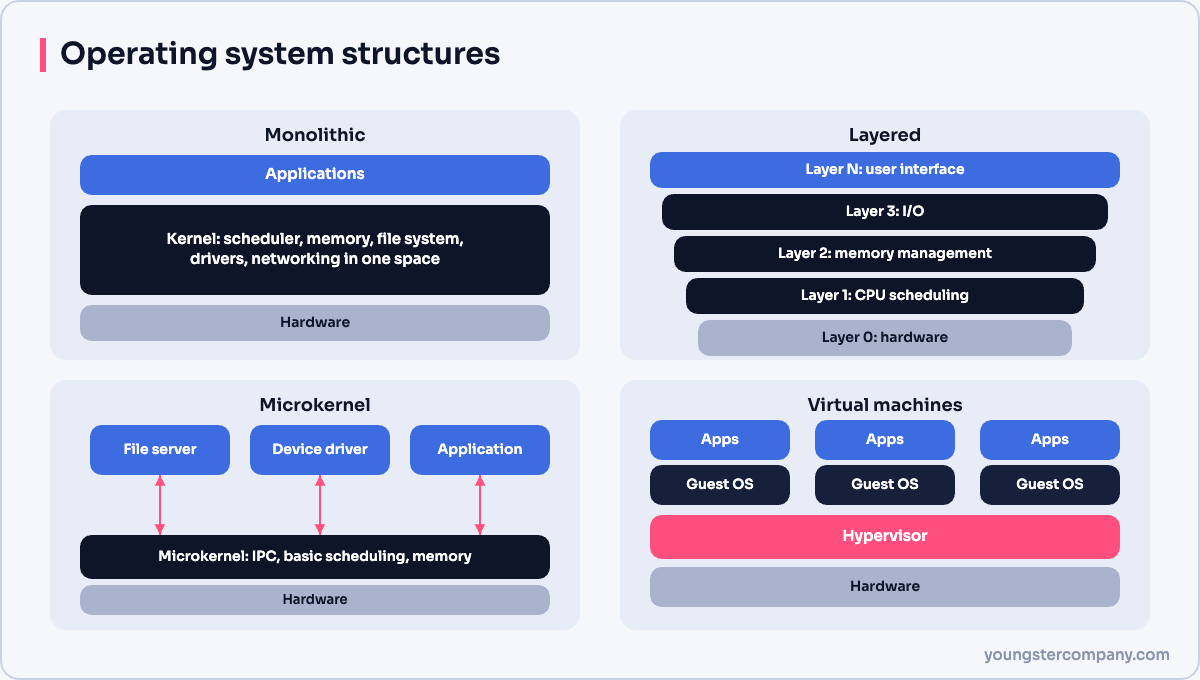
1. Simple structure
Early systems such as MS-DOS had no clear separation between components. Applications could call hardware routines directly, and there was little protection between programs. This was fast on limited hardware. However, one faulty program could crash the whole system.
2. Monolithic structure
In a monolithic kernel, the whole operating system, including scheduling, memory management, file systems and device drivers, runs as one large program in kernel mode.
- Advantages: fast, because components call each other directly without switching modes.
- Disadvantages: a bug in any driver can crash the entire kernel, and the code base is large.
- Examples: traditional Unix and the Linux kernel.
3. Layered structure
A layered design splits the OS into levels. Layer 0 is the hardware, and the top layer is the user interface. Each layer uses only the services of the layer below it.
- Advantages: easier to design, test and debug, because you can verify one layer at a time.
- Disadvantages: it is hard to decide the right order of layers, and passing requests through many layers adds overhead.
- Example: the THE system built by Edsger Dijkstra’s team in the 1960s.
4. Microkernel structure
A microkernel keeps only the essentials in kernel mode: basic scheduling, memory management and inter-process communication (IPC). Other services, such as file systems and drivers, run as user-space processes.
- Advantages: more reliable and secure, because a failing driver does not crash the kernel. It is also easier to port.
- Disadvantages: more messages between components, which can slow performance.
- Examples: MINIX 3, QNX (used in cars and medical devices) and seL4, a formally verified microkernel.
5. Modular structure
Many modern kernels are monolithic at heart but load parts as modules at run time. For example, Linux can load a driver for a new USB device without a reboot. As a result, you get much of the speed of a monolithic kernel with some of the flexibility of a microkernel.
6. Hybrid structure
Hybrid kernels mix approaches. They keep many services in kernel mode for speed, but borrow microkernel ideas such as message passing.
- Windows NT family (Windows 10, 11 and Server) uses a hybrid design.
- macOS and iOS use XNU, which combines the Mach microkernel with BSD components.
Virtual machines
A virtual machine treats the hardware and kernel as if they were separate machines. A hypervisor gives each guest operating system its own virtual CPU, memory and devices.
- Type 1 hypervisors run directly on hardware, such as VMware ESXi, Microsoft Hyper-V and KVM.
- Type 2 hypervisors run on top of a host OS, such as VirtualBox.
Virtualization provides isolation, easier testing and better hardware use. Containers go a step further by sharing one kernel between isolated user spaces.
Comparison
| Structure | Speed | Reliability | Example |
|---|---|---|---|
| Simple | High | Low | MS-DOS |
| Monolithic | High | Medium | Linux, traditional Unix |
| Layered | Medium | High | THE system |
| Microkernel | Lower | High | QNX, MINIX 3, seL4 |
| Hybrid | High | Medium to high | Windows, macOS |
Related guides
Sources
Running Linux servers in production? Our Linux server hardening & security audit checks configuration, patching, SSH and logging. You can also use our free Linux server hardening checklist, or contact us.