RAM is limited, and many processes need it at the same time. Memory management in operating system design decides which process gets which part of memory, keeps processes from interfering with each other and reclaims memory when they finish. Good memory management keeps the system fast and stable.
This guide explains address binding, logical and physical addresses, swapping, contiguous allocation and its problems, and how modern systems solve them with paging and virtual memory.
Goals of memory management
- Allocation: give each process the memory it needs.
- Protection: stop a process from reading or changing another’s memory.
- Sharing: let processes share code, such as libraries, safely.
- Efficiency: use RAM well and avoid wasted gaps.
- Abstraction: let programs use simple addresses without knowing where data really sits.
Address binding
Programs refer to memory through addresses, and these must eventually map to real locations in RAM. This mapping, called binding, can happen at three times:
| When | How | Example |
|---|---|---|
| Compile time | The compiler uses fixed physical addresses | Simple embedded programs |
| Load time | The loader adjusts addresses when the program loads | Older relocatable programs |
| Execution time | Hardware translates addresses on every access | All modern desktop and server systems |
Logical vs physical addresses
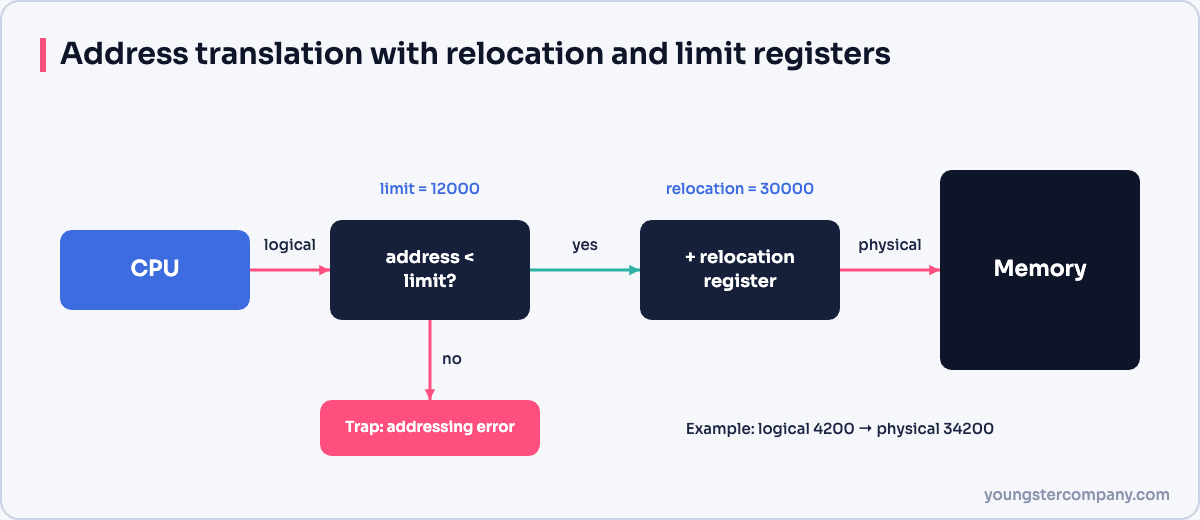
The CPU generates logical (virtual) addresses. The memory management unit (MMU) translates them into physical addresses in RAM. In the simplest scheme, the MMU adds a relocation register value to every logical address and checks it against a limit register. If a process tries to go beyond its limit, the hardware traps to the OS.
Dynamic loading and linking
With dynamic loading, a routine loads into memory only when it is first called. Similarly, dynamic linking loads shared libraries, such as .so files on Linux or .dll files on Windows, at run time. As a result, many programs can share one copy of a library in memory.
Swapping
When memory is tight, the OS can move a process, or parts of it, out to disk and bring it back later. This is swapping.
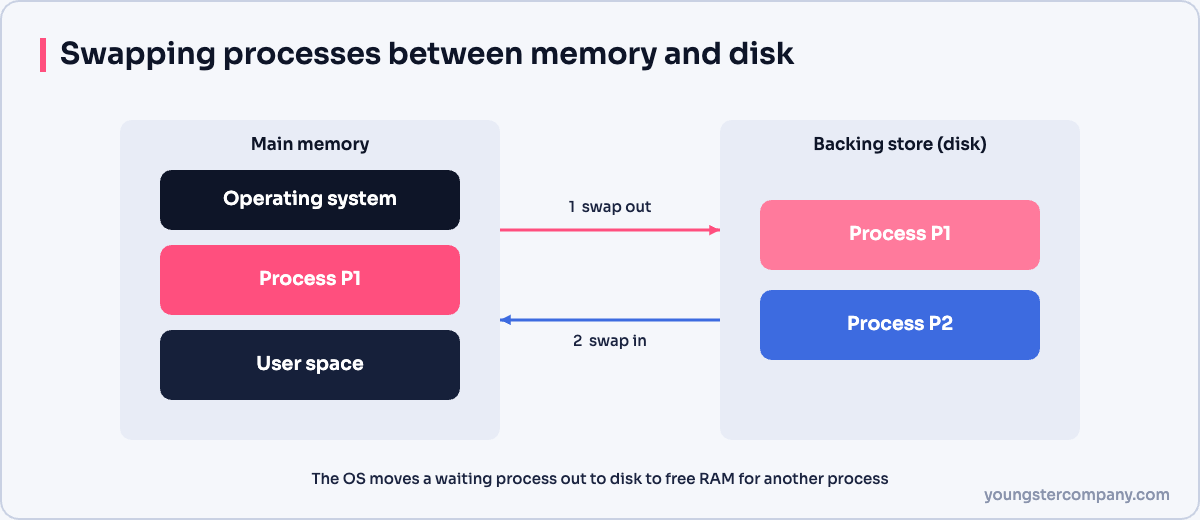
Swapping lets more processes run than RAM can hold. However, disk is far slower than RAM, so heavy swapping makes the system sluggish. Modern systems usually swap individual pages rather than whole processes. See our guide to creating swap on Linux.
Contiguous memory allocation
Early systems gave each process one continuous block of memory.
Fixed partitioning
Memory is divided into partitions of set sizes when the system starts. It is simple. However, a small process in a large partition wastes space (internal fragmentation), and the number of partitions limits how many processes can run.
Dynamic partitioning
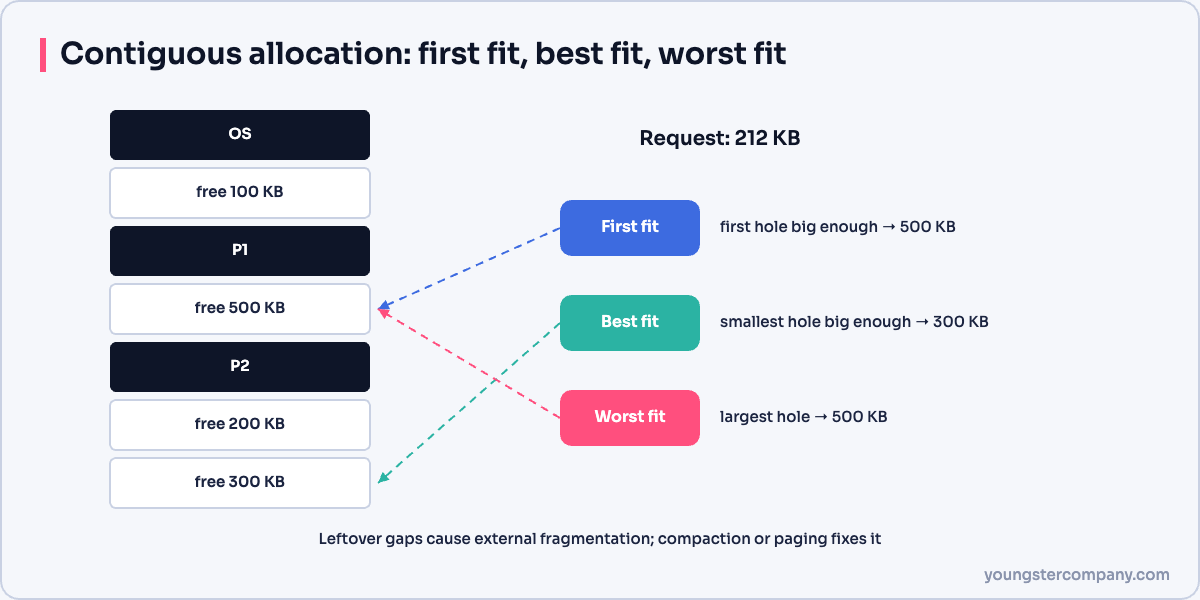
Partitions are created at run time to fit each process exactly. This avoids internal fragmentation. Over time, though, free memory breaks into small scattered holes (external fragmentation). The OS can compact memory to merge the holes, but that is slow.
To choose a hole for a new process, the OS uses strategies such as:
- first fit: the first hole that is large enough;
- best fit: the smallest hole that is large enough;
- worst fit: the largest hole.
Non-contiguous allocation: paging and segmentation
Modern systems avoid these problems by letting a process occupy many separate pieces of memory:
- Paging splits memory into fixed-size pages and frames. Read our guide to paging.
- Segmentation splits it into logical segments, such as code, data and stack.
Combined with virtual memory, paging lets programs use large address spaces while only the active parts sit in RAM. Learn more in virtual memory.
Comparison
| Technique | Fragmentation | Flexibility |
|---|---|---|
| Fixed partitions | Internal | Low |
| Dynamic partitions | External | Medium |
| Paging | Small internal only | High |
| Segmentation | External | High, matches program structure |
Sources
Running Linux servers in production? Our Linux server hardening & security audit checks configuration, patching, SSH and logging. You can also use our free Linux server hardening checklist, or contact us.