The OSI model has seven layers, and memorising their names is easy. Understanding what each layer actually does is harder. This OSI model analogy follows a real-world task, sending a bicycle to a friend in another city, and maps every step to a layer.
Read it alongside our full guide to everything about the OSI model. Then the technical details will make much more sense.
The scenario
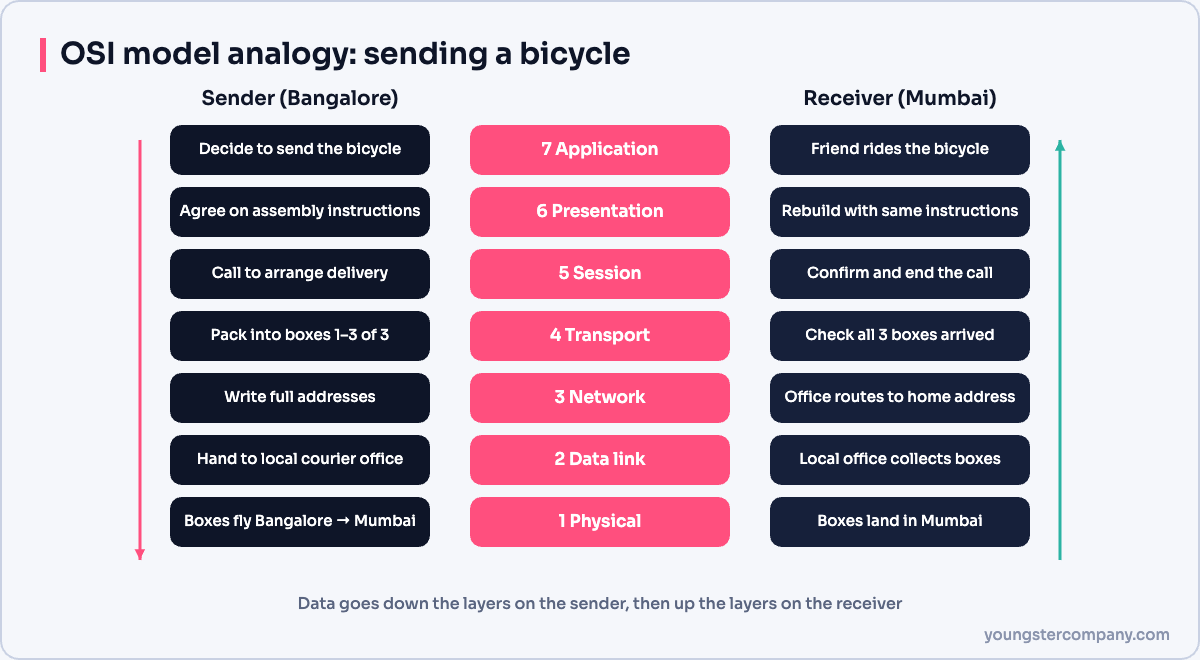
You live in Bangalore and want to send your bicycle to a friend in Dadar, Mumbai. The bicycle is too big to post in one piece, so you need to plan, pack, label and ship it. Your friend then has to receive, check and rebuild it.
Sending data across a network works the same way. The sender’s layers prepare the data from top to bottom, layer 7 to layer 1. The receiver’s layers then reverse the process from bottom to top.
The sender’s side
Layer 7: Application layer
You decide to send the bicycle. This is the reason for the whole exchange. In networking, the application layer is where programs such as a web browser or email client request a network service, using protocols like HTTP, SMTP or DNS.
Layer 6: Presentation layer
Next, you check how to take the bicycle apart so your friend can rebuild it. You both need to understand the same instructions. Similarly, the presentation layer makes sure both systems understand the data format. It also handles encryption and compression, for example TLS encryption or JPEG images.
Layer 5: Session layer
Then you call your friend to confirm the address and agree on the delivery. The call opens a conversation, and it ends when you are done. Likewise, the session layer opens, manages and closes communication sessions between two applications.
Layer 4: Transport layer
Now you take the bicycle apart and pack the pieces into three boxes. You label them “1 of 3”, “2 of 3” and “3 of 3”, so your friend can tell if one is missing. In networking terms, the transport layer splits data into segments, numbers them and checks that they all arrive. TCP does this reliably, while UDP skips the checks for speed.
Layer 3: Network layer
After that, you write your friend’s full address, and your own, on every box. The address decides the route between cities. In the same way, the network layer adds source and destination IP addresses to create packets, and routers use them to choose a path.
Layer 2: Data link layer
You take the boxes to the local Bangalore courier office, which handles the next hop of the journey. The data link layer works in the same local way. It wraps packets into frames with MAC addresses, so they reach the next device on the same network, such as your router.
Layer 1: Physical layer
Finally, a plane flies the boxes to Mumbai. The plane does not care what is inside; it just moves them. Likewise, the physical layer sends raw bits as electrical signals, light pulses or radio waves.
The receiver’s side
Now the process runs in reverse, from layer 1 up to layer 7.
- Physical: the boxes land in Mumbai, just as bits arrive over cable or Wi-Fi.
- Data link: the Dadar courier office collects the boxes from the airport. Similarly, the receiving network card accepts frames addressed to its MAC address.
- Network: the office reads the address and sends the boxes to your friend’s home. In the same way, the IP address confirms the packet has reached the right host.
- Transport: your friend checks that all three boxes arrived, then reassembles the bicycle. If a box were missing, he would ask for it again, as TCP does.
- Session: he calls to say everything arrived, and you end the call.
- Presentation: he follows the same instructions to rebuild the bicycle, so it looks exactly as you sent it.
- Application: finally, your friend rides the bicycle around Dadar. The data has reached the application that needed it.
The OSI model analogy at a glance
| Layer | Bicycle analogy | Networking job | Data unit |
|---|---|---|---|
| 7 Application | Deciding to send the bicycle | Network services for apps | Data |
| 6 Presentation | Shared assembly instructions | Format, encryption, compression | Data |
| 5 Session | Phone call to arrange delivery | Open and close sessions | Data |
| 4 Transport | Numbered boxes | Segmentation, reliability, ports | Segment |
| 3 Network | Full postal address | Logical addressing, routing | Packet |
| 2 Data link | Local courier office | MAC addressing, next hop | Frame |
| 1 Physical | The flight | Signals on the medium | Bits |
How data really flows
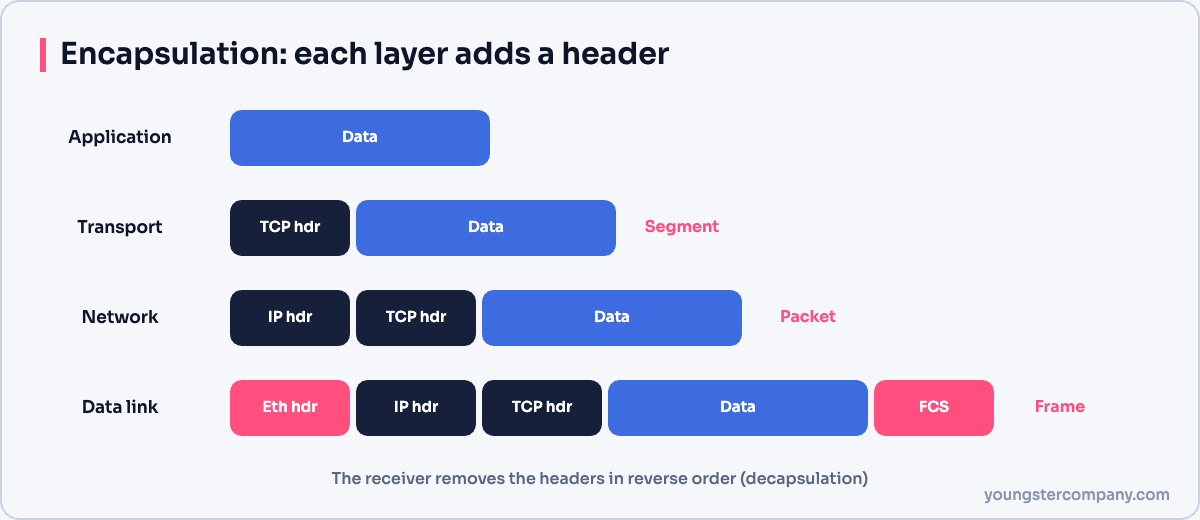
In a real network, each layer adds its own header as data moves down. This is called encapsulation. At the receiver, each layer removes its header as data moves up, which is called decapsulation.
Today’s internet actually runs on the simpler TCP/IP model. However, engineers still use OSI layer numbers every day, for example when they talk about a “layer 2 switch” or a “layer 7 firewall”. Learn how the two compare in our guide to the TCP/IP model.
Sources
Need help with network security? We test routers, firewalls, ACLs and segmentation as part of our VAPT services and hardening audits. Contact us for a quote.