
A computer network is two or more devices connected so they can share data and resources. The internet is the largest network of all: a global network of networks. This guide covers internet and networking basics for complete beginners, from types of networks to how data travels and how to stay safe.
What is a computer network?
A network connects devices, such as computers, phones, printers and servers, so they can communicate. Networks let people share files, printers and internet connections, use email and video calls, and access applications in the cloud.
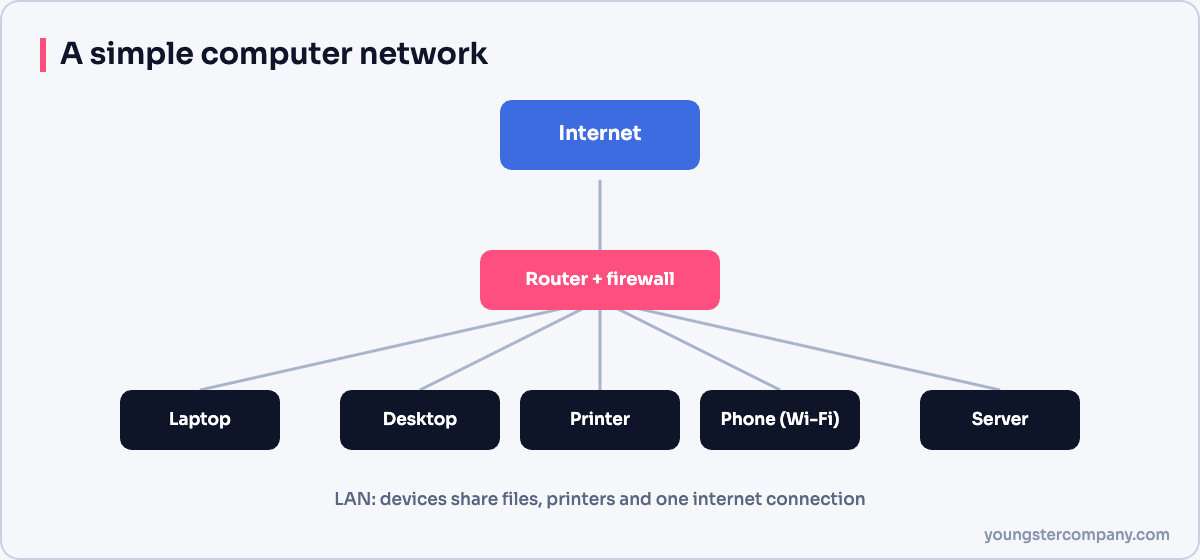
Every network needs:
- devices that send and receive data;
- a medium, such as cables or Wi-Fi;
- network equipment, such as switches and routers;
- protocols, the agreed rules for communication.
Types of networks by size
| Type | Coverage | Example |
|---|---|---|
| PAN (personal area network) | A few metres | Bluetooth earbuds and a phone |
| LAN (local area network) | A home, office or building | Office Wi-Fi and wired network |
| MAN (metropolitan area network) | A city | A city-wide network linking campuses |
| WAN (wide area network) | Countries and continents | A company linking offices; the internet |
A WAN connects LANs over long distances, using leased lines, fibre, MPLS, SD-WAN or the internet itself.
How the internet began
The internet grew from ARPANET, a US research network first connected in 1969. Over time, more universities and organizations joined, and many separate networks appeared. On 1 January 1983, ARPANET adopted the TCP/IP protocols, which let different networks connect into one internet. In 1989 to 1991, Tim Berners-Lee created the World Wide Web, which made the internet easy to use for everyone.
How data travels across the internet
- Your device breaks data into small packets.
- Each packet carries the destination’s IP address.
- Routers forward packets hop by hop towards the destination.
- Packets may take different routes and arrive out of order.
- The receiving device reassembles them, and TCP requests any missing pieces.
Behind the scenes, DNS translates names like example.com into IP addresses. Read more in internet and web technology basics.
Key protocols to know
| Protocol | Job |
|---|---|
| IP | Addresses and routes packets |
| TCP | Reliable, ordered delivery |
| UDP | Fast delivery without guarantees |
| DNS | Translates names to IP addresses |
| DHCP | Gives devices IP settings automatically |
| HTTP/HTTPS | Transfers web pages, encrypted with HTTPS |
Wired vs wireless networking
Wired Ethernet is faster, more stable and more secure. Wi-Fi is convenient and supports mobile devices. Most homes and offices use both. For wireless, use WPA3 or at least WPA2 encryption and a strong password.
Staying safe online
- Keep devices and routers updated.
- Use strong, unique passwords and enable MFA.
- Change default router passwords.
- Be careful with links and attachments in emails and messages.
- Prefer HTTPS websites, and avoid sensitive tasks on public Wi-Fi without a trusted VPN.
Where to go next
Learn the layered models that explain networking: the OSI model and the TCP/IP model. Then explore network devices and topologies.
Sources
Need help with network security? We test routers, firewalls, ACLs and segmentation as part of our VAPT services and hardening audits. Contact us for a quote.