
Transmission media are the physical paths that carry data between devices. They work at layer 1 of the OSI model, turning bits into electrical signals, light or radio waves. The types of transmission media fall into two groups: guided (wired) and unguided (wireless). Each has different speed, distance, cost and security trade-offs.
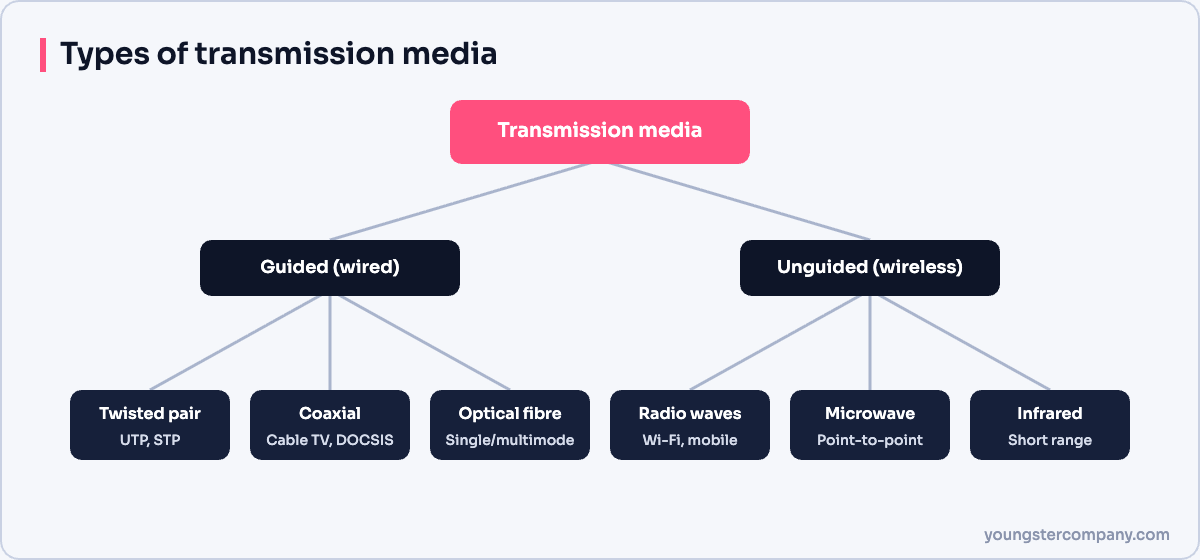
Guided media (wired)
Twisted pair cable
Twisted pair is the most common LAN cable. Pairs of copper wires twist around each other to reduce interference.
- UTP (unshielded twisted pair): cheap and flexible; used in most offices.
- STP or FTP (shielded): extra foil or braid for noisy environments, such as factories.
| Category | Typical maximum speed | Common use |
|---|---|---|
| Cat 5e | 1 Gbps up to 100 m | Older and budget installations |
| Cat 6 | 1 Gbps up to 100 m; 10 Gbps up to about 55 m | Most new offices |
| Cat 6A | 10 Gbps up to 100 m | Wi-Fi access points, servers |
| Cat 8 | 25 or 40 Gbps up to 30 m | Data centre links |
Coaxial cable
Coaxial cable has a central copper conductor, insulation, a metal shield and an outer jacket. It resists interference well and supports long runs. Today, it mainly carries cable TV and cable broadband (DOCSIS).
Optical fibre
Fibre carries data as pulses of light through glass strands. It offers very high bandwidth, long distances and immunity to electrical interference. It is also harder to tap without detection.
- Single-mode fibre: a narrow core and laser light; used over many kilometres, for example by ISPs and FTTH connections.
- Multimode fibre: a wider core; used for shorter links inside buildings and data centres.
Printed circuit lines
Inside devices, signals travel on circuit board traces called microstrip and stripline. These matter to hardware designers rather than network administrators.
Unguided media (wireless)
Radio waves
Radio waves travel in all directions and pass through walls. Wi-Fi (2.4, 5 and 6 GHz), Bluetooth, mobile networks and FM radio all use them. Because anyone nearby can receive the signal, encryption, such as WPA3, is essential.
Microwaves
Microwaves use higher frequencies and travel in straight lines. Point-to-point microwave links connect buildings or mobile towers, and satellites use microwave frequencies too. They need a clear line of sight.
Infrared
Infrared works over short distances and cannot pass through walls. TV remotes are the classic example.
Guided vs unguided media
| Guided | Unguided | |
|---|---|---|
| Medium | Copper or fibre cable | Air or space |
| Speed | Very high, especially fibre | Lower and shared |
| Interference | Low, especially fibre | Higher |
| Mobility | None | High |
| Security | Harder to intercept | Easier to intercept; needs encryption |
Baseband vs broadband
- Baseband uses the whole medium for one signal at a time, as Ethernet does.
- Broadband splits the medium into several channels at different frequencies, as cable TV does.
Ethernet cable types
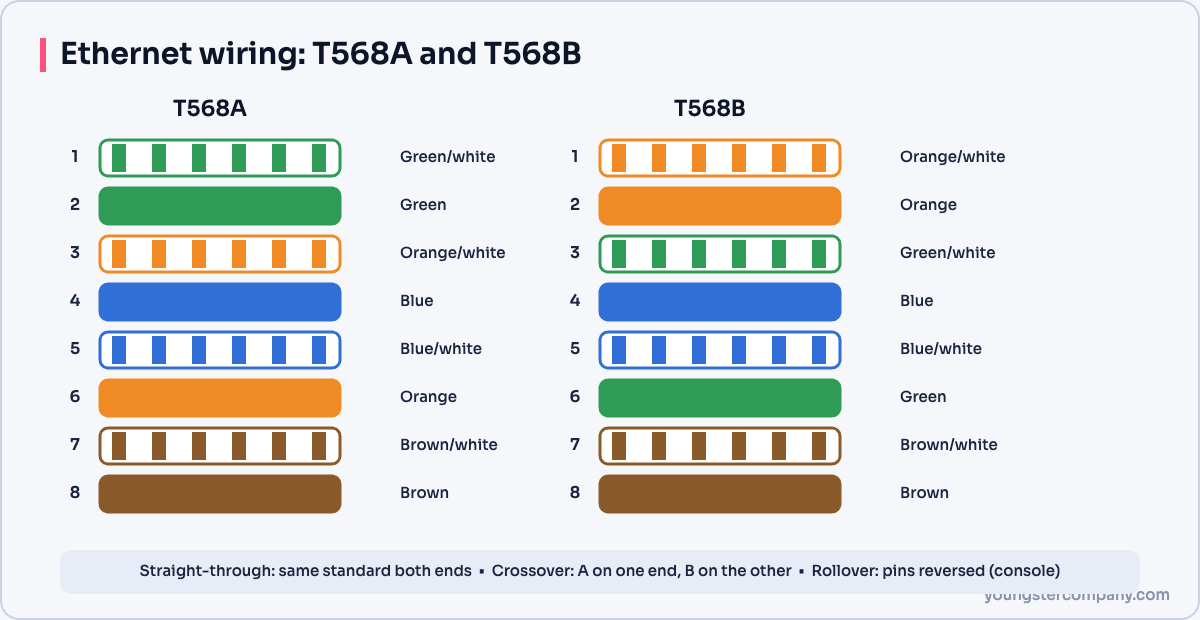
- Straight-through cable: both ends use the same wiring standard (T568A or T568B). It connects different device types, such as a PC to a switch.
- Crossover cable: one end uses T568A and the other T568B. It connected similar devices, such as switch to switch. Today, most ports support Auto-MDIX, so a straight-through cable works for both.
- Rollover (console) cable: reverses all pins. It connects a computer to a router or switch console port for initial setup. Many modern devices use USB console ports instead.
Related guides
Sources
Need help with network security? We test routers, firewalls, ACLs and segmentation as part of our VAPT services and hardening audits. Contact us for a quote.