Every network, from a home Wi-Fi setup to a data centre, is built from a handful of device types arranged in a particular layout. Understanding network devices and topologies helps you design networks, troubleshoot problems and talk confidently with engineers.
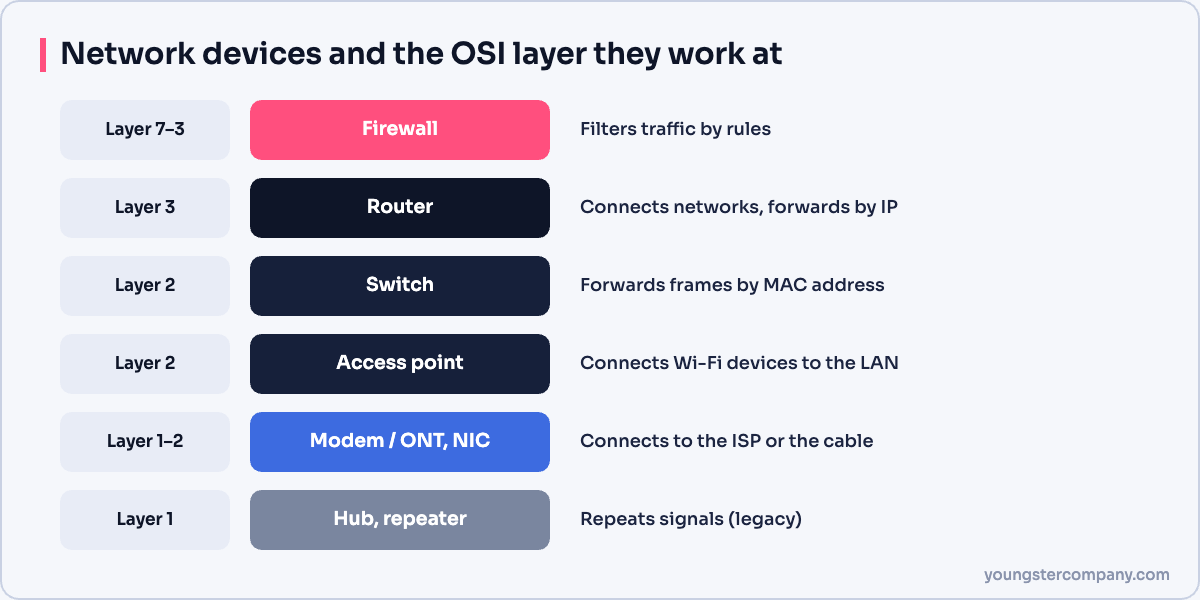
Common network devices
| Device | OSI layer | What it does |
|---|---|---|
| Modem / ONT | 1–2 | Connects your network to the ISP over DSL, cable or fibre |
| Network interface card (NIC) | 1–2 | Connects a device to the network; has a MAC address |
| Repeater | 1 | Regenerates a weak signal to extend distance |
| Hub | 1 | Repeats every signal to all ports (obsolete) |
| Switch | 2 (some 3) | Forwards frames to the right port using MAC addresses |
| Router | 3 | Connects networks and forwards packets by IP address |
| Wireless access point | 1–2 | Connects Wi-Fi devices to the wired network |
| Firewall | 3–7 | Filters traffic based on security rules |
| Gateway | Various | Translates between different networks or protocols |
Modem and ONT
A modem converts signals between your network and the ISP’s line. With fibre broadband, an ONT (optical network terminal) does this job.
Network interface card
Every connected device has a NIC, wired or wireless. Each NIC has a unique MAC address. Read what is a MAC address.
Hub vs switch
A hub sends every frame to every port, which wastes bandwidth and causes collisions. A switch learns where devices are and sends frames only to the right port. Switches replaced hubs years ago.
Router
A router connects different networks, such as your office LAN and the internet. It reads IP addresses and chooses the best path. Home routers usually combine a router, switch, Wi-Fi access point and firewall in one box.
Firewall
A firewall allows or blocks traffic based on rules. Next-generation firewalls also inspect applications, detect intrusions and filter websites.
Gateway
A gateway connects networks that use different protocols or formats. The term “default gateway” also describes the router that devices use to leave their local network.
Network topologies
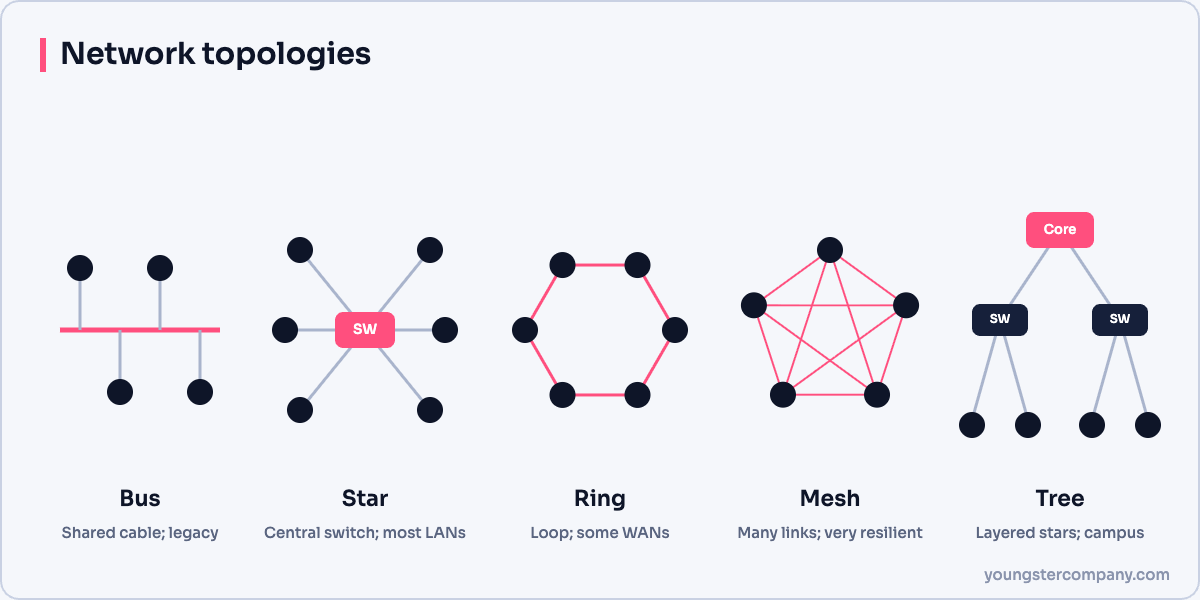
A topology describes how devices are connected. The physical topology is the actual cabling, while the logical topology is how data flows.
| Topology | Description | Pros | Cons |
|---|---|---|---|
| Bus | All devices share one cable | Cheap, simple | One break stops everything; obsolete |
| Ring | Each device connects to two neighbours in a loop | Predictable performance | A single failure can break the ring unless it is dual |
| Star | All devices connect to a central switch | Easy to manage; one cable failure affects one device | The central switch is a single point of failure |
| Mesh | Devices have multiple connections to each other | Very resilient | Expensive and complex |
| Tree (hierarchical) | Stars connected in layers | Scalable, organised | Depends on upper-layer links |
| Hybrid | A mix of topologies | Flexible | More complex design |
Topologies in real networks
- Offices use a star or tree design: access switches connect to distribution and core switches.
- Data centres often use a leaf-spine design, a form of partial mesh, for predictable performance.
- Wireless mesh systems extend Wi-Fi coverage in homes and campuses.
- WAN backbones use partial mesh for redundancy between sites.
Choosing a design
For most organizations, a hierarchical star design with redundant core links works well. Add redundancy where an outage would hurt the business most, such as uplinks, core switches and internet connections.
Related guides
Sources
Need help with network security? We test routers, firewalls, ACLs and segmentation as part of our VAPT services and hardening audits. Contact us for a quote.