A MAC (Media Access Control) address is a hardware identifier assigned to a network interface. Switches use it to deliver frames to the right device on a local network. This guide explains the MAC address format, the main MAC address types, how it differs from an IP address and how privacy features change it.

Why we need MAC addresses
IP addresses get data to the right network. Once data arrives on the local network, however, devices communicate in frames at layer 2, and frames are addressed by MAC address. A switch learns which MAC address sits on which port and forwards frames only where needed.
MAC address format
A MAC address is 48 bits long, usually written as six pairs of hexadecimal digits:
00:1A:2B:3C:4D:5E(Linux and macOS style)00-1A-2B-3C-4D-5E(Windows style)001A.2B3C.4D5E(Cisco style)
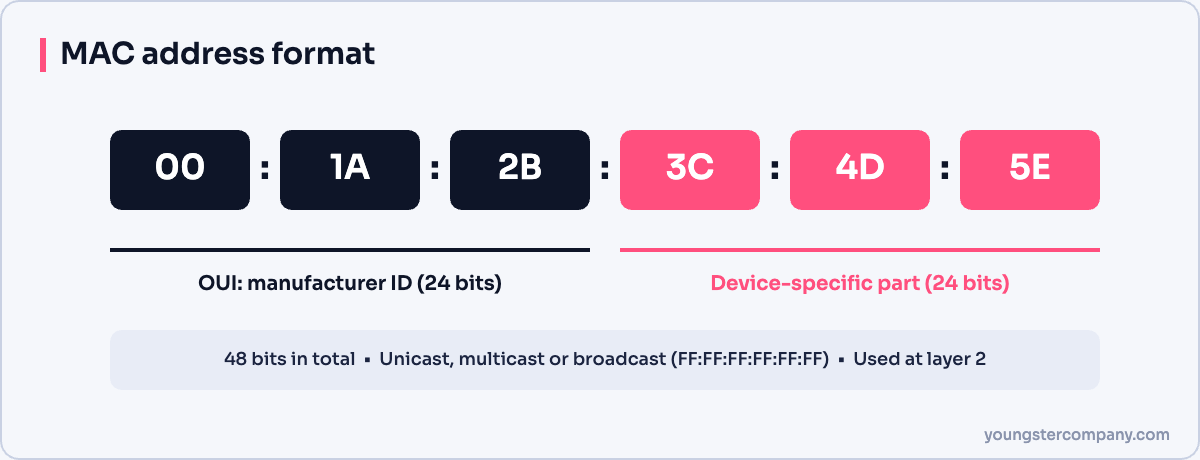
The first three bytes form the OUI (Organizationally Unique Identifier), which identifies the manufacturer. The last three bytes are assigned by the manufacturer to each interface.
Two bits in the first byte have special meaning:
- The I/G bit shows whether the address is individual (unicast) or group (multicast).
- The U/L bit shows whether the address is universally administered (set by the manufacturer) or locally administered (set by software).
Types of MAC addresses
| Type | Meaning | Example |
|---|---|---|
| Unicast | One specific interface | 00:1A:2B:3C:4D:5E |
| Multicast | A group of interfaces | 01:00:5E:xx:xx:xx for IPv4 multicast |
| Broadcast | Every device on the local network | FF:FF:FF:FF:FF:FF |
Frames sent to the broadcast address reach every device in the same broadcast domain or VLAN. ARP requests, for example, use broadcast.
MAC address vs IP address
| MAC address | IP address | |
|---|---|---|
| OSI layer | Layer 2 (data link) | Layer 3 (network) |
| Length | 48 bits | 32 bits (IPv4) or 128 bits (IPv6) |
| Scope | Local network only | End-to-end across networks |
| Assigned by | Manufacturer or OS | DHCP or administrator |
| Changes when moving networks? | Usually not | Yes |
ARP links the two in IPv4: it finds the MAC address that belongs to an IP address on the local network. IPv6 uses Neighbor Discovery for the same job. See IPv4 and IPv6 explained.
How to find your MAC address
- Windows:
ipconfig /allorgetmac. - Linux:
ip link. - macOS:
ifconfigor System Settings > Network. - Cisco switch:
show mac address-tablelists learned addresses.
MAC randomisation
To protect privacy, modern phones and laptops use a random MAC address for each Wi-Fi network. Therefore, network teams cannot always rely on MAC addresses to identify devices, for example in DHCP reservations or captive portals.
MAC addresses and security
- MAC spoofing: attackers can change their MAC address easily, so MAC filtering alone is weak security.
- MAC flooding: attackers fill a switch’s MAC table so it floods traffic; port security limits addresses per port.
- ARP spoofing: attackers send fake ARP replies to intercept traffic; Dynamic ARP Inspection helps prevent it.
For switch protection, see network switch configuration.
Sources
Need help with network security? We test routers, firewalls, ACLs and segmentation as part of our VAPT services and hardening audits. Contact us for a quote.