AAA in networking stands for authentication, authorization and accounting. It is the framework that decides who can log in to a network or device, what they can do there, and what record is kept of their actions. Almost every enterprise network uses it, from Wi-Fi logins to administrator access on routers and firewalls.
This guide explains each part of AAA, compares the two main protocols, RADIUS and TACACS+, and walks through a Cisco configuration with a safe local fallback.
The three parts of AAA
Authentication: who are you?
First, authentication proves a user’s identity. Typically, the user provides a password, a certificate, a token or a combination of these. The AAA server then checks the credentials against a directory such as Active Directory. If the check fails, access stops here.
Authorization: what may you do?
Once the user is known, authorization decides what they can access. For example, a helpdesk engineer might run show commands on a router but not change its configuration. Similarly, a guest Wi-Fi user might reach the internet but not internal servers.
Accounting: what did you do?
Finally, accounting records activity. It logs when a session started and ended, how much data it used and, with TACACS+, every command an administrator entered. Organizations use these records for audits, troubleshooting, incident investigation and sometimes billing.
Why centralised AAA in networking matters
Without AAA in networking, each device keeps its own local accounts. As a result, passwords get shared, former employees keep access and nobody knows who changed what. Centralised AAA fixes this:
- One place to add, change or remove accounts.
- Consistent password and MFA policies.
- Role-based access across hundreds of devices.
- A full audit trail, which standards such as ISO 27001 and PCI DSS expect.
RADIUS vs TACACS+
In practice, two protocols carry AAA traffic between network devices and the AAA server.
| Feature | RADIUS | TACACS+ |
|---|---|---|
| Transport | UDP 1812 (auth) and 1813 (accounting); older devices use 1645/1646 | TCP 49 |
| Encryption | Hides only the password | Encrypts the whole packet body |
| AAA functions | Combines authentication and authorization | Separates all three functions |
| Command authorization | Not supported per command | Supported and logged per command |
| Typical use | Network access: Wi-Fi (802.1X), VPN, NAC | Administrator access to routers, switches, firewalls |
| Standard | RFC 2865 and RFC 2866 | RFC 8907 (2020) |
In short, use RADIUS for users who connect to the network, and TACACS+ for engineers who manage network devices. Many organizations run both, often on the same server platform, such as Cisco ISE.
How AAA works: a login example
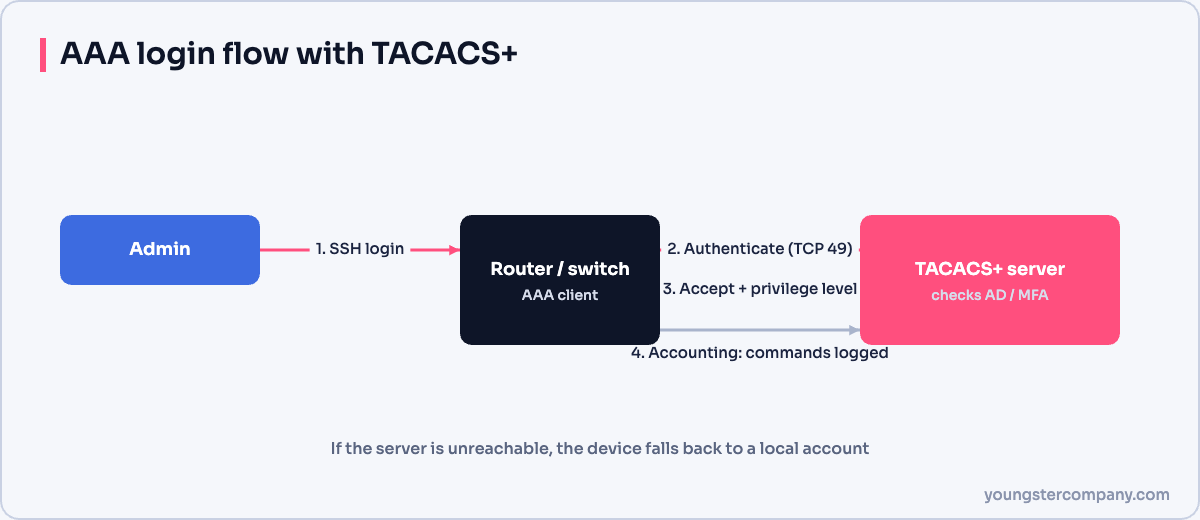
Consider an engineer who connects to a switch over SSH:
- The switch asks for a username and password.
- Next, it sends them to the TACACS+ server.
- The server checks the user in Active Directory and replies “accept”.
- Then the switch asks the server what privilege level the user has.
- Finally, each command the engineer types is authorized and logged.
If the TACACS+ server is unreachable, the switch falls back to the next method in its list, such as a local account.
Cisco AAA configuration example
For instance, the example below uses the newer server syntax supported by current IOS and IOS XE releases.
Router(config)# aaa new-model
Router(config)# username localadmin privilege 15 algorithm-type scrypt secret Str0ng-Local-Pass
!
Router(config)# tacacs server TAC1
Router(config-server-tacacs)# address ipv4 192.168.1.2
Router(config-server-tacacs)# key Str0ng-Shared-Key
Router(config-server-tacacs)# exit
!
Router(config)# aaa group server tacacs+ TAC-GROUP
Router(config-sg-tacacs+)# server name TAC1
Router(config-sg-tacacs+)# exit
!
Router(config)# aaa authentication login VTY-AUTH group TAC-GROUP local
Router(config)# aaa authorization exec VTY-AUTH group TAC-GROUP local
Router(config)# aaa accounting commands 15 default start-stop group TAC-GROUP
!
Router(config)# line vty 0 4
Router(config-line)# login authentication VTY-AUTH
Router(config-line)# authorization exec VTY-AUTH
Router(config-line)# transport input ssh
Here is what it does. First, aaa new-model turns on AAA. Next, the router learns the TACACS+ server and its shared key. The method list VTY-AUTH tries TACACS+ first and uses the local account only if the server does not answer. As a result, you can still log in during an outage. Finally, accounting logs every privilege-15 command, and the VTY lines accept SSH only.
Tip: create the local fallback account before you enable aaa new-model. Otherwise, you may lock yourself out.
Best practices
- Use TACACS+ for device administration and RADIUS with 802.1X for user access.
- Always keep a local fallback account, with a long password stored in a vault.
- Use strong, unique shared keys for each server.
- Add MFA for administrator logins where possible.
- Send accounting logs to a SIEM and review them.
FAQ
Is AAA the same as RADIUS?
No. Instead, AAA is the framework. RADIUS and TACACS+ are protocols that implement it.
What is the difference between authentication and authorization?
Authentication confirms identity, whereas authorization decides what that identity can do after logging in.
Sources
Need help with network security? We test routers, firewalls, ACLs and segmentation as part of our VAPT services and hardening audits. Contact us for a quote.