Security controls are the safeguards that reduce risk: policies, technical settings, processes and physical measures. Many organizations buy tools first and think later. A better approach is to design and implement security controls based on real risks, then check that they actually work.
This guide explains control types, a step-by-step design process, how frameworks such as the CIS Controls help, and how to keep controls effective over time.
Types of controls
By nature
- Administrative: policies, procedures, training and background checks.
- Technical: firewalls, MFA, encryption, EDR and logging.
- Physical: locks, badges, CCTV and fire suppression.
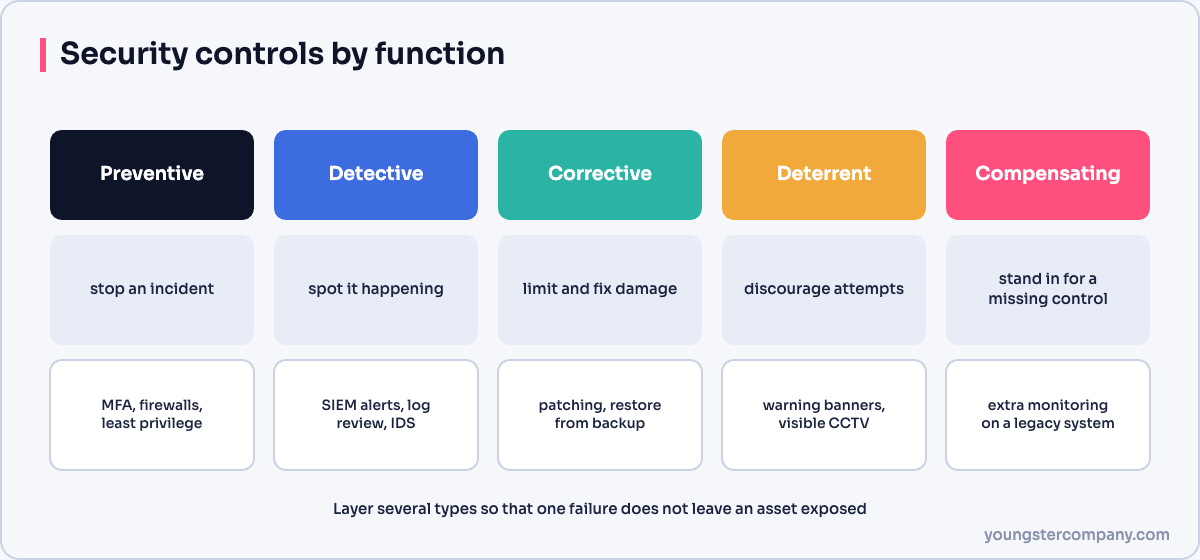
By function
| Function | Purpose | Example |
|---|---|---|
| Preventive | Stop incidents happening | MFA, access control |
| Detective | Spot incidents in progress | SIEM alerts, file integrity monitoring |
| Corrective | Limit damage and restore | Backups, incident response |
| Deterrent | Discourage attackers | Warning banners, visible cameras |
| Compensating | Replace a control you cannot implement | Extra monitoring where duties cannot be split |
Strong security combines several types, so one failure does not lead to a breach. This idea is called defence in depth.
A step-by-step design process
1. Understand what you protect
List your critical assets and data, and who owns them. Then decide what matters most: confidentiality, integrity or availability.
2. Assess the risks
Identify threats, such as ransomware, phishing or insider misuse, and the weaknesses they could exploit. Rate each risk by likelihood and impact.
3. Choose controls
Select controls that reduce the highest risks to an acceptable level. Use a framework so you do not miss areas:
- CIS Critical Security Controls: a prioritised list of 18 controls with implementation groups for small to large organizations.
- ISO/IEC 27001 Annex A: 93 controls used for certification.
- NIST Cybersecurity Framework 2.0: six functions: Govern, Identify, Protect, Detect, Respond and Recover.
4. Define requirements
Write each control as a clear, testable requirement. For example: “All remote access requires MFA” is testable, while “remote access should be secure” is not.
5. Implement
Assign an owner, budget and timeline. Integrate the control with existing systems and processes, and automate where possible, because automated controls are more consistent.
6. Test
Confirm that each control works as designed. For instance, try logging in without MFA, restore a backup or trigger a test alert.
7. Monitor and improve
Track metrics and review controls after incidents, audits and major changes. Retire controls that no longer add value.
Quick wins for most organizations
- An accurate inventory of hardware, software and cloud services.
- MFA for email, remote access and admin accounts.
- Fast patching of internet-facing systems.
- Offline or immutable backups, tested regularly.
- Endpoint protection on all devices.
- Central logging with alerts on key events.
- Security awareness training and phishing simulations.
Useful metrics
- Percentage of accounts with MFA.
- Time to patch critical vulnerabilities.
- Backup restore success rate.
- Phishing simulation click rate.
- Mean time to detect and respond to incidents.
Common mistakes
- Buying tools without owners to run them.
- Writing policies that nobody enforces.
- Never testing controls.
- Ignoring the cost and friction for users, which leads to workarounds.
Related guides
Sources
Preparing for an ISO 27001 or IT audit? Our ISO 27001 readiness assessment finds your gaps before the auditor does. You can also start with our free ISO 27001:2022 readiness checklist, or contact us for a quote.