
Last updated: 23 October 2026. Commands use Cisco IOS / IOS XE syntax and work the same on Cisco Packet Tracer, GNS3/CML and real routers. Part of our networking series; next: extended ACLs.
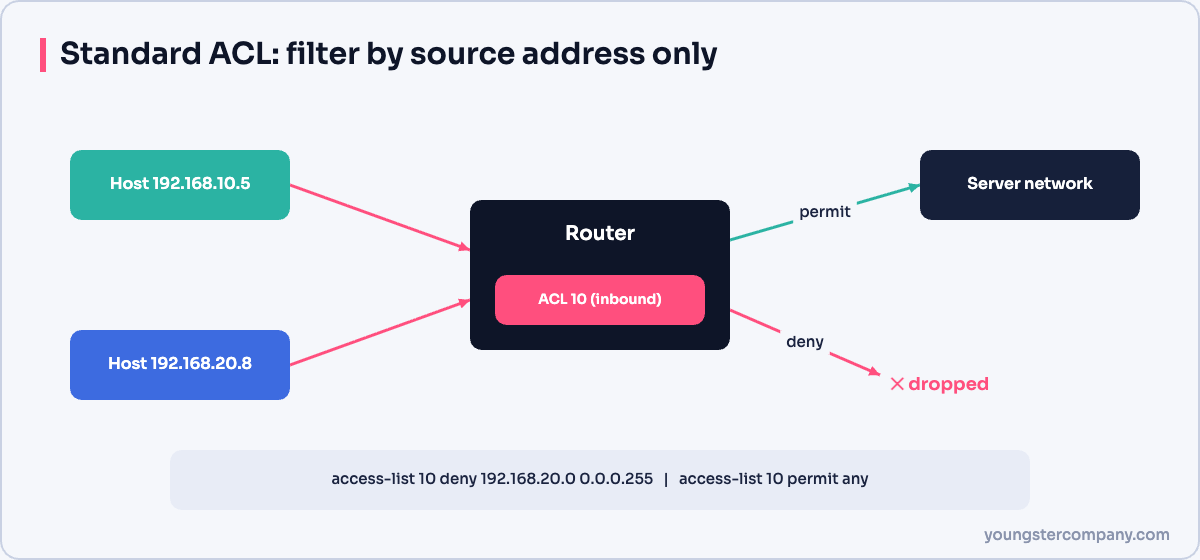
A standard ACL (access control list) filters traffic using only the source IP address. It is the simplest type of ACL on a Cisco router and is ideal for jobs like “block this host”, “allow only this network” or “restrict who can SSH to the router”. This guide explains how standard ACLs work, how to calculate wildcard masks, where to place them, and gives tested configuration patterns for hosts, networks and subnets.
How standard ACLs work
- Numbered ranges: 1–99 and 1300–1999. You can also create named standard ACLs.
- Matches source only: no destination, protocol or port. For those, use an extended ACL.
- Top-down, first match: the router checks lines in order and stops at the first match, so put specific lines before general ones.
- Implicit deny: every ACL ends with an invisible
deny any. An ACL with onlydenylines blocks everything, so addpermit anywhen you only want to block a few sources. - One ACL per interface, per direction, per protocol (for example one inbound and one outbound IPv4 ACL on GigabitEthernet0/1).
Wildcard masks in 30 seconds
ACLs use a wildcard mask instead of a subnet mask: a 0 bit means “must match” and a 1 bit means “ignore”. The quick way to calculate it is to subtract the subnet mask from 255.255.255.255:
| Network | Subnet mask | Wildcard mask | Matches |
|---|---|---|---|
| Single host | 255.255.255.255 | 0.0.0.0 (or keyword host) | 1 address |
| /24 | 255.255.255.0 | 0.0.0.255 | 256 addresses |
| /27 | 255.255.255.224 | 0.0.0.31 | 32 addresses |
| /28 | 255.255.255.240 | 0.0.0.15 | 16 addresses |
| /16 | 255.255.0.0 | 0.0.255.255 | 65,536 addresses |
| Everything | 0.0.0.0 | 255.255.255.255 (or keyword any) | All addresses |
Where to place a standard ACL
Because a standard ACL only knows the source, placing it near the source would block that source from reaching every destination. The rule is therefore: place standard ACLs as close to the destination as possible, and extended ACLs as close to the source as possible. In the diagram below, to stop traffic from Router A’s LAN reaching Router D’s LAN, the standard ACL goes outbound on Router D’s LAN interface.
Configuration patterns
The examples use private addresses. Apply the ACL to an interface with ip access-group <number|name> in|out; until you do, the ACL has no effect.
1. Permit a single host (deny everyone else)
Router(config)# access-list 10 remark Only the admin PC may reach the server LAN
Router(config)# access-list 10 permit host 192.168.10.5
! implicit "deny any" blocks everyone else
Router(config)# interface GigabitEthernet0/1
Router(config-if)# ip access-group 10 out
2. Deny a single host (permit everyone else)
Router(config)# access-list 11 deny host 192.168.10.66
Router(config)# access-list 11 permit any
Router(config)# interface GigabitEthernet0/1
Router(config-if)# ip access-group 11 out
3. Permit or deny a whole network
! Permit only 192.168.10.0/24
Router(config)# access-list 12 permit 192.168.10.0 0.0.0.255

! Deny 172.16.0.0/16, permit everything else
Router(config)# access-list 13 deny 172.16.0.0 0.0.255.255
Router(config)# access-list 13 permit any
4. Permit or deny a single subnet
Say 192.168.20.0/24 is divided into /28 subnets: 192.168.20.0, .16, .32, .48 and so on, each with 16 addresses. To permit only the subnet 192.168.20.48/28 (usable hosts .49–.62), use wildcard 0.0.0.15:
Router(config)# access-list 14 permit 192.168.20.48 0.0.0.15To deny the subnet 192.168.30.64/27 (addresses .64–.95) and allow everything else, use wildcard 0.0.0.31:
Router(config)# access-list 15 deny 192.168.30.64 0.0.0.31
Router(config)# access-list 15 permit any
Modern IOS treats subnet zero (for example 192.168.20.0/28) as a normal, usable subnet, so count subnets from .0, not .16.
5. Restrict SSH access to the router itself
One of the most useful jobs for a standard ACL is protecting the router’s own management access. Apply it to the VTY lines with access-class (not ip access-group):
Router(config)# access-list 20 remark Management subnet only
Router(config)# access-list 20 permit 192.168.1.0 0.0.0.255
Router(config)# line vty 0 4
Router(config-line)# access-class 20 in
Router(config-line)# transport input ssh
6. Named standard ACLs (recommended)
Named ACLs are easier to read and let you insert or delete individual lines using sequence numbers:
Router(config)# ip access-list standard BLOCK-GUESTS
Router(config-std-nacl)# 10 deny 192.168.50.0 0.0.0.255
Router(config-std-nacl)# 20 permit any
Router(config-std-nacl)# exit
Router(config)# interface GigabitEthernet0/1
Router(config-if)# ip access-group BLOCK-GUESTS out

! Later, insert a line between 10 and 20
Router(config)# ip access-list standard BLOCK-GUESTS
Router(config-std-nacl)# 15 permit host 192.168.50.10
Verify and troubleshoot
Router# show access-lists                  ! all ACLs with match counters
Router# show ip interface GigabitEthernet0/1 | include access list
Router# show running-config | section access-list
Router# clear access-list counters ! reset counters before testing- Everything is blocked: you probably forgot
permit anyafter your deny lines. - Nothing is blocked: the ACL is not applied, is applied in the wrong direction, or a broader permit line appears earlier.
- Counters not increasing: the traffic is not passing through that interface in that direction.
Frequently asked questions
What is the difference between a standard and an extended ACL?
A standard ACL matches only the source address. An extended ACL can match source and destination addresses, protocols (TCP, UDP, ICMP) and ports. See our types of ACLs guide.
Can a standard ACL filter IPv6?
No. IPv6 ACLs are always named and work like extended ACLs (ipv6 access-list NAME, applied with ipv6 traffic-filter).
Is an ACL a firewall?
An ACL is a stateless packet filter. It is useful for basic segmentation and protecting management access, but a stateful firewall is needed to track connections and inspect applications.
Related: What is an ACL? · Types of ACLs · Extended ACL examples
Need help with network security? We review router and firewall configurations, ACLs and segmentation as part of our VAPT services and hardening audits. Contact us for a quote.





Pingback: ACLs: Permit/Deny Source & Destination Addresses, and Protocols