VLAN Trunking Protocol (VTP) is a Cisco protocol that shares VLAN information between switches. You create a VLAN once on a server switch, and VTP advertises it to the other switches in the same domain. As a result, you avoid typing the same VLANs on dozens of switches.
However, VTP has a well-known risk: one wrong switch can wipe the VLANs from an entire network. This guide explains how VTP works, its modes and versions, and how to use it safely.
The problem VTP solves
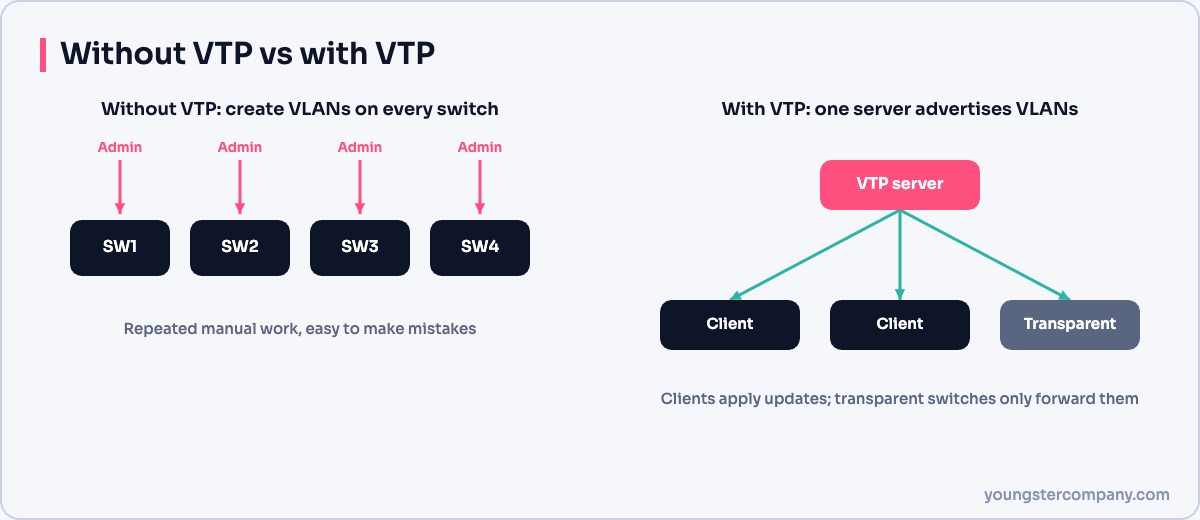
In a campus network, every access switch needs the same VLANs. Without VTP, an engineer must add, rename or delete each VLAN on every switch by hand. Mistakes are common: a typo in a VLAN name, a missing VLAN on one switch, or a VLAN left behind after a project ends.
VTP keeps the VLAN database consistent. Moreover, it reports new VLANs across the network automatically.
How VLAN Trunking Protocol works
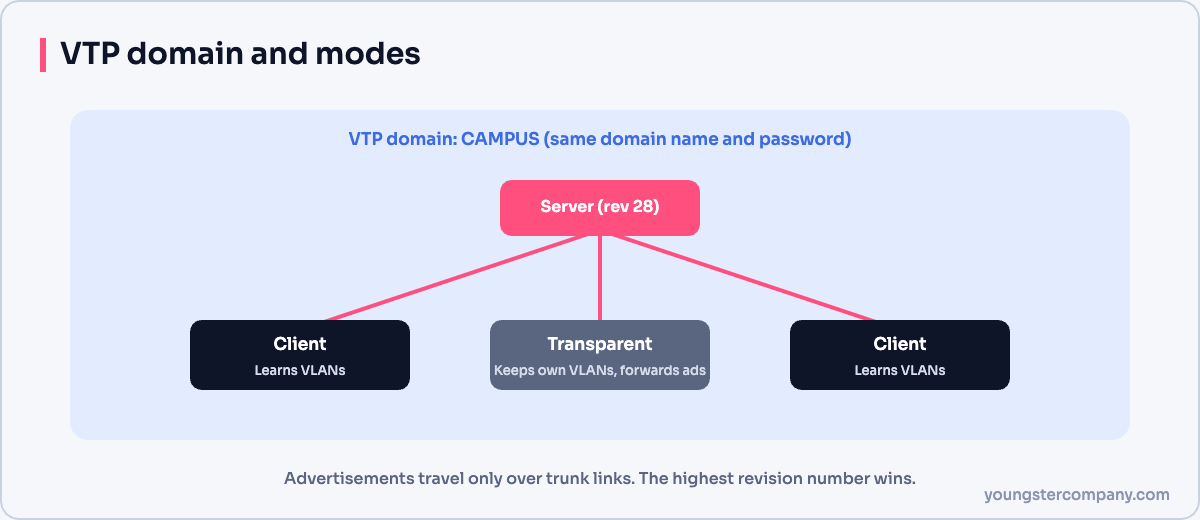
VTP groups switches into a VTP domain. Switches only exchange information with others in the same domain, and only over trunk links.
Each change on a server increases the configuration revision number. The server then sends an advertisement with the new VLAN list. Other switches compare revision numbers and accept the advertisement only if its number is higher than their own. In addition, switches send summary advertisements every five minutes.
VTP modes
| Mode | Create or change VLANs? | Applies advertisements? | Forwards advertisements? |
|---|---|---|---|
| Server (default) | Yes | Yes | Yes |
| Client | No | Yes | Yes |
| Transparent | Yes, locally only | No | Yes, over trunks |
| Off | Yes, locally only | No | No |
The off mode is available in VTP version 3 and in newer IOS releases for earlier versions.
VTP versions 1, 2 and 3
- Version 1: the original version. It carries normal-range VLANs (1 to 1005) only.
- Version 2: adds Token Ring support and consistency checks. In transparent mode, it also forwards advertisements regardless of version.
- Version 3: carries extended-range VLANs (1006 to 4094) and private VLANs. It also adds a primary server: only that switch can push changes, which greatly reduces the risk of accidental overwrites. Furthermore, it can hide the domain password in the configuration.
The revision number risk
This is the most important thing to understand about VTP. Imagine a lab switch with a higher revision number than your production domain. If you connect it with the same domain name and a trunk link, the other switches accept its VLAN list. Consequently, VLANs that do not exist on the lab switch disappear across the network, and ports in those VLANs go inactive.
To prevent this, before you connect any switch:
- Set it to transparent mode, which resets the revision number to zero.
- Alternatively, change the domain name to a dummy value and back again.
- Check with
show vtp statusthat the revision number is 0.
How to configure VTP
The commands below set up a server, a client and a password. Use your own domain name and a strong password.
On the server switch:
Switch(config)# vtp domain CAMPUS
Switch(config)# vtp version 2
Switch(config)# vtp mode server
Switch(config)# vtp password Str0ngVtpPass
Switch(config)# vlan 10
Switch(config-vlan)# name USERS
On each client switch:
Switch(config)# vtp domain CAMPUS
Switch(config)# vtp mode client
Switch(config)# vtp password Str0ngVtpPass
For VTP version 3, set vtp version 3 on all switches. Then make one switch the primary server from privileged EXEC mode with vtp primary vlan.
Remember that VTP only travels over trunks. So configure the uplinks as trunk ports, for example with switchport mode trunk.
How to verify VTP
| Command | What to check |
|---|---|
show vtp status | Version, domain name, mode and configuration revision |
show vtp counters | Advertisements sent and received, and errors |
show vtp password | The configured password |
show vlan brief | Whether the expected VLANs exist on the switch |
If a client does not learn VLANs, check the domain name and password first. Both are case-sensitive. Then confirm that the link is really a trunk.
Should you use VTP today?
Many network teams now run VTP in transparent or off mode and manage VLANs with automation tools such as Ansible. That approach avoids the revision risk entirely. On the other hand, VTP version 3 with a primary server is a reasonable choice if you want central VLAN management on Cisco-only networks.
Also, consider VTP pruning. It stops broadcast traffic for a VLAN from crossing trunks to switches that have no ports in that VLAN.
Sources
Need help with network security? We test routers, firewalls, ACLs and segmentation as part of our VAPT services and hardening audits. Contact us for a quote.