
What is Linux? Strictly speaking, Linux is an operating system kernel: the core program that manages hardware, memory and processes. In everyday use, the Linux operating system means the complete systems built around that kernel, called distributions. Linux runs most web servers, cloud platforms, supercomputers, Android phones and countless devices.
This guide covers its history, how distributions work, popular choices and the Linux file system layout.
A short history
- 1969: Unix is created at Bell Labs. Its design ideas shape Linux decades later.
- 1983: Richard Stallman launches the GNU Project to build a free Unix-like system.
- 1991: Linus Torvalds, a student in Finland, announces a new free kernel. Combined with GNU tools, it forms a complete system.
- 1992: the kernel moves to the GNU General Public License (GPL).
- 1990s to 2000s: distributions such as Slackware, Debian, Red Hat and SUSE appear, and Linux spreads through servers.
- 2008 onwards: Android brings the Linux kernel to billions of phones.
- Today: Linux dominates cloud computing, containers and supercomputers.
Learn how Linux and Unix differ in Linux vs Unix.
How the Linux operating system is built: kernel vs distribution
The kernel alone is not enough to use a computer. A distribution combines it with:
- system tools, such as GNU utilities and systemd;
- a package manager to install and update software;
- default settings, a desktop environment or a server-focused setup;
- documentation, security updates and support.
Popular distributions
| Distribution | Base | Typical use |
|---|---|---|
| Ubuntu | Debian | Desktops, servers, cloud |
| Debian | Independent | Stable servers, base for many others |
| Fedora | Independent (Red Hat sponsored) | Up-to-date desktops and developers |
| Red Hat Enterprise Linux (RHEL) | Fedora / CentOS Stream | Enterprise servers with paid support |
| Rocky Linux, AlmaLinux | RHEL-compatible | Free enterprise servers |
| Linux Mint | Ubuntu | Beginner-friendly desktops |
| Arch Linux | Independent | Enthusiasts who want control and rolling updates |
| openSUSE / SUSE Linux Enterprise | Independent | Desktops and enterprise servers |
| Kali Linux, Parrot OS | Debian | Security testing and research |
Distributions also follow different release styles. Fixed releases, such as Ubuntu LTS, change slowly and get long support. Rolling releases, such as Arch, update continuously.
The Linux file system hierarchy
Linux uses a single directory tree that starts at the root, /. Disks and partitions are mounted into this tree, rather than appearing as drive letters.
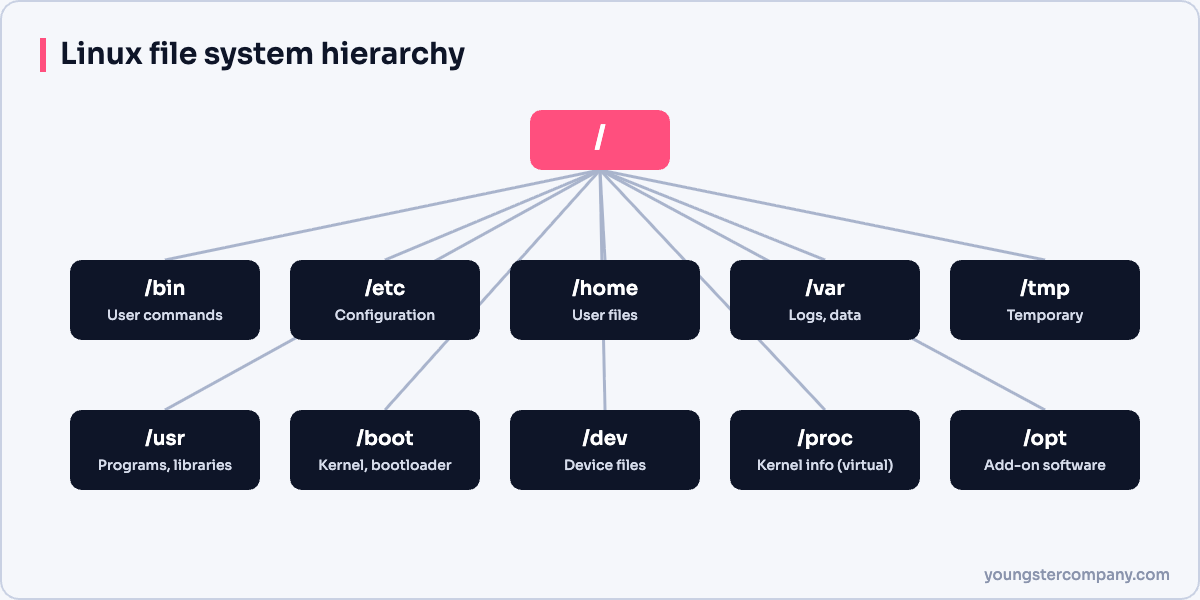
| Directory | Contents |
|---|---|
/bin, /usr/bin | User commands |
/sbin, /usr/sbin | System administration commands |
/etc | Configuration files |
/home | Users’ personal files |
/root | The root user’s home directory |
/var | Changing data: logs, caches, mail, databases |
/tmp | Temporary files |
/usr | Installed software and libraries |
/boot | Kernel and bootloader files |
/dev | Device files, such as disks |
/proc, /sys | Virtual files exposing kernel and process information |
/opt | Optional third-party software |
/mnt, /media | Mount points for extra or removable storage |
Many modern distributions merge /bin into /usr/bin, but the classic paths still work.
Where to start
Try Linux in a virtual machine, then learn the essentials in our guide to Linux fundamentals and basic commands. For motivation, read 10 reasons to use Linux.
Sources
Running Linux servers in production? Our Linux server hardening & security audit checks configuration, patching, SSH and logging. You can also use our free Linux server hardening checklist, or contact us.




Pingback: Reasons Why We Should Use Linux? - Youngster Company
Pingback: Difference between Linux and Unix - Youngster Company
Pingback: Linux Interview Questions - Youngster Company
Pingback: Difference between Linux and Windows - Youngster Company
Pingback: Linux Fundaments and Basic Commands - Youngster Company