VLANs split a switch into separate broadcast domains. That improves security and performance, but devices in different VLANs cannot talk to each other on their own. They need a Layer 3 device to route between them. This guide explains the three common methods and walks through the inter-VLAN routing configuration for each on Cisco equipment.
In all examples, VLAN 10 (Sales) uses 192.168.10.0/24 and VLAN 20 (HR) uses 192.168.20.0/24. Each PC uses the router or switch address ending in .1 as its default gateway.

Method 1: Legacy inter-VLAN routing
The router has one physical interface per VLAN. Each router interface connects to a switch access port in a different VLAN.
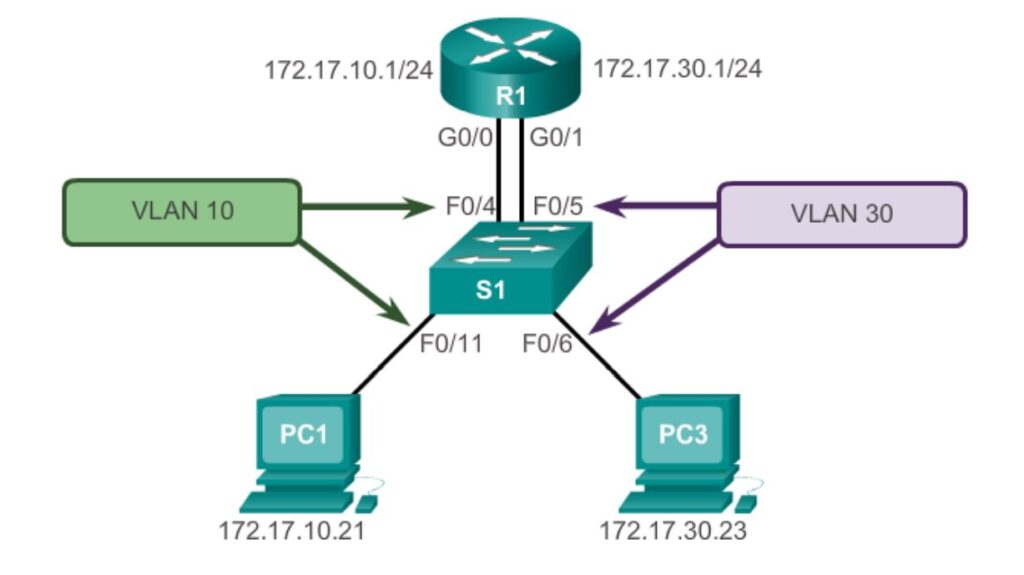
Switch:
vlan 10
 name Sales
vlan 20
 name HR
interface GigabitEthernet0/1
 switchport mode access
 switchport access vlan 10
interface GigabitEthernet0/2
 switchport mode access
 switchport access vlan 20
Router:
interface GigabitEthernet0/0
 ip address 192.168.10.1 255.255.255.0
 no shutdown
interface GigabitEthernet0/1
 ip address 192.168.20.1 255.255.255.0
 no shutdown
This works, but it does not scale. Every new VLAN needs another router port and another cable.
Method 2: Router-on-a-stick
One physical link carries all VLANs as an 802.1Q trunk. The router uses one subinterface per VLAN.
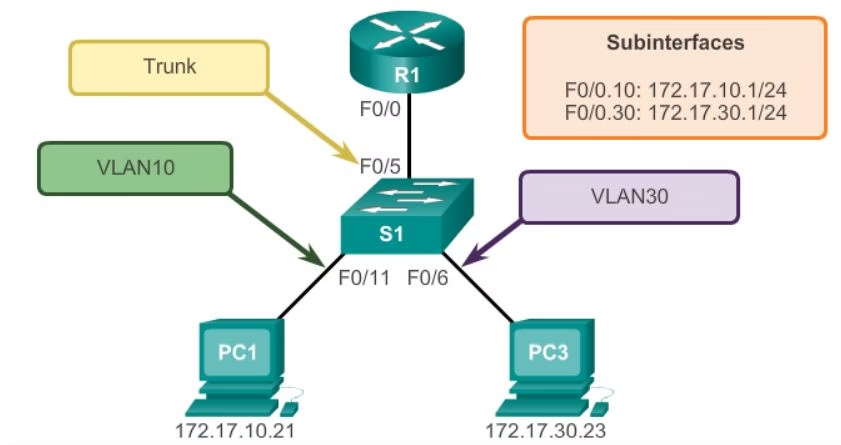
Switch:
interface GigabitEthernet0/24
 switchport mode trunk
 switchport trunk allowed vlan 10,20
On some older switches, you must first set switchport trunk encapsulation dot1q.
Router:
interface GigabitEthernet0/0
 no shutdown
interface GigabitEthernet0/0.10
 encapsulation dot1Q 10
 ip address 192.168.10.1 255.255.255.0
interface GigabitEthernet0/0.20
 encapsulation dot1Q 20
 ip address 192.168.20.1 255.255.255.0
Router-on-a-stick saves ports and cables. However, all inter-VLAN traffic shares one link, which can become a bottleneck.
Method 3: Layer 3 switch with SVIs
A multilayer switch routes between VLANs in hardware using switched virtual interfaces (SVIs). This is the standard design in modern campus networks.
ip routing
!
interface Vlan10
 ip address 192.168.10.1 255.255.255.0
 no shutdown
interface Vlan20
 ip address 192.168.20.1 255.255.255.0
 no shutdown
The ip routing command enables routing on the switch. An SVI comes up only when at least one port in that VLAN is active.
Comparison
| Method | Scalability | Performance | Typical use |
|---|---|---|---|
| Legacy | Poor: one port per VLAN | Good per VLAN | Labs and very small networks |
| Router-on-a-stick | Medium | Limited by one trunk link | Small offices, branch sites |
| Layer 3 switch (SVIs) | High | Wire-speed routing | Enterprise and campus networks |
Verify inter-VLAN routing
| Command | What to check |
|---|---|
show vlan brief | Ports are in the right VLANs |
show interfaces trunk | The trunk is up and allows the VLANs |
show ip interface brief | Router or SVI interfaces are up with correct IPs |
show ip route | Both VLAN subnets appear as connected routes |
ping from a PC | Hosts can reach the other VLAN |
Troubleshooting tips
- Wrong default gateway on PCs: each PC must use the gateway in its own VLAN.
- VLAN missing from the trunk: check
switchport trunk allowed vlan. - Mismatched VLAN tag: the
encapsulation dot1Qnumber must match the VLAN ID. - SVI down: make sure the VLAN exists and has an active port.
Once traffic flows, consider ACLs to control which VLANs may talk. See our ACL questions and answers.
Related guides
Sources
Need help with network security? We test routers, firewalls, ACLs and segmentation as part of our VAPT services and hardening audits. Contact us for a quote.